I apologize for my lack of posts... I've been working with SharePoint and it's taking all my power not throw my computer...
Hopefully soon you'll be hearing more about some of my projects I'll be starting now that I've graduated.
Also I've discovered a humorous and attractive side of Mr. Gosling for us nerdy girls :)
//END OF LINE
Tuesday, April 10, 2012

Monday, March 19, 2012
Enyo Woes!!!
Since I've finished my senior project, (I know it's not necessary to state that every time, but I'm super excited its done) I've been able to work a little bit more in the Enyo framework with WebOS.
I've been working on a goal tracker program but I've run into some problems. I'm hoping some one will have an answer! I've posted on the Enyo forums to no avail!
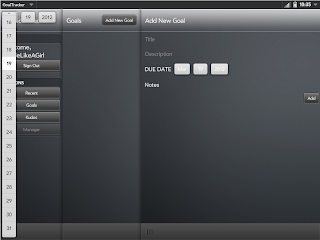
This is a problem I'm having with all the pickers in this project. None of them are opening up where they should. They always open up in the left hand corner. I haven't changed any of the code for the date picker, I'll I do is create one and put it in component and it opens up in the wrong place! Here's the code:

I've been working on a goal tracker program but I've run into some problems. I'm hoping some one will have an answer! I've posted on the Enyo forums to no avail!

{kind:"DatePicker", labelClass: "whitetxtColor", label: "Due Date", name: "addDate"}

I've been working on making my app look a lot nice with some css. I've been mostly successful minus this modal dialog for deleting goals. This first shot is just the normal standard css, the second is my attempt to change things. All I did was simply change the className and contentClassName properties and it does change them... just not the entire ModalDialog. Any tips on how to fix this problem? Here's the code:
{kind: "ModalDialog", name: "deletePopup", className: "bkdark", contentClassName: "bkdark", components: [//END OF LINE
{kind: "VFlexBox", flex: 1, components:[
{content: "", name: "confirmDel"},
{kind: "HFlexBox", components: [
{kind: "Button", flex: 1, caption: "Cancel", onclick: "cancelClick"},
{kind: "Button", flex: 1, className: "enyo-button-negative", caption: "Delete", onclick: "confirmClick"}
]}]}]}
Wednesday, March 7, 2012
Project Finished
I just have to show off... :D


And proof that it actually can do more than just that QR code, here's three different ones and they are a different version than the previous one.
Here's a link to the google code project. You can use whatever pictures... it's just very temperamental... you can only have a white background and the lighting has to be just so... but it works... mostly!
//END OF LINE

Yes, it's a QR code to my blog... but more importantly it works even when rotated.

And proof that it actually can do more than just that QR code, here's three different ones and they are a different version than the previous one.
Here's a link to the google code project. You can use whatever pictures... it's just very temperamental... you can only have a white background and the lighting has to be just so... but it works... mostly!
//END OF LINE
Tuesday, March 6, 2012
FINISHED!!!!!!
So it works! I've finished the programming part of my project! I was super excited to get it done!!!
I ended up using a library to take the bits of data and find the text/website that the QR code had stored in it.
It definitely still needs a lot of work before it will be really useful, but it should pass all the tests I need it to for this class!
//END OF LINE
I ended up using a library to take the bits of data and find the text/website that the QR code had stored in it.
It definitely still needs a lot of work before it will be really useful, but it should pass all the tests I need it to for this class!
//END OF LINE
Wednesday, February 29, 2012
Rotations Take 2
After finally sitting down and focusing on the math part, I was able to get my program to rotate my image by some angle of whatever I want!
 I'm pretty excited because that means I'm that much closer to being done. I also implemented an edge detection algorithm, which was pretty fun, and I'll be using it in conjunction with my rotation function to figure out and correct the skew of the image.

//END OF LINE


//END OF LINE
Thursday, February 23, 2012
It's all 1s and 0s
Luckily I've been getting back to working on this project... I sorta realized that it's due in a little over a month and I am bound and determined to have a life (besides doing this...).
Today I still skipped out on working on rotations... (once again not looking forward to the trig and matrix multiplication I'll probably have to be doing) but I did get something else accomplished. Once I have the QR Code pulled out, I can determine the bits of information from that image.

//END OF LINE
Today I still skipped out on working on rotations... (once again not looking forward to the trig and matrix multiplication I'll probably have to be doing) but I did get something else accomplished. Once I have the QR Code pulled out, I can determine the bits of information from that image.

So there's the original image, the pulled out and rotated QR Code and then the data array of all the bits of info! Unfortunately it only works on pretty straight, non-skewed images... I'll eventually get it there though.
All I have left to do is determine what the bits have been encoded to, finish the rotation stuff, and possible port this to an Android phone... (the last part is still to be determined... I may not have the time to get that done and will have to resort to something else....)
//END OF LINE
Wednesday, February 22, 2012
Rotations!
After a few hours of work I was able to get this....

//END OF LINE

The images on the lefts are the original picture and the ones on the right are the extracted QR code in the correct position!!!
Sadly it only currently works when the QR code is rotated 90, 180, or 270 degrees...
Unfortunately getting the rest of the rotations is going to involve some trigonometry. I haven't done that in a while and my brain has been mush the last couple of days from playing way too much minecraft. But soon I will google enough trig to rotate my image and get this project finished... hopefully!
//END OF LINE
Subscribe to:
Posts (Atom)