The plan is I should have a git repository online tonight. I will post the link to that later.
But for now I made a quick run a scrolling the background and moving a little dude around the screen left and right with basic, basic jumping. The code is a mess though and it definitely doesn't do what I actually need it to yet but it's something.
//END OF LINE
Wednesday, September 4, 2013

Friday, August 30, 2013
Super Doctor Who Update 1
I got to work on it a little bit today. I don't have a link to the project yet because it's not quite up on any svn/git system yet... Hopefully it will be by early next week.
But I have decided to do my project in C# using XNA. I've used this before and I love it. Visual Studios is my favorite IDE. So I got the project started and I have a menu system set up. It just has a timed title screen that goes into what will be the menu which then goes into the "game screen" (it's just a placeholder image for now) and that one has a pause screen. I used these little things called enums.
enum GameState
{
TitleScreen,
MenuScreen,
GameScreen,
PauseScreen
}
And then you can just use a simple switch case to differentiate in the Update and Draw methods. Pretty easy. I've started some designing of how I'm going to set up the game, I'll update on that when I have more to say.
//END OF LINE
But I have decided to do my project in C# using XNA. I've used this before and I love it. Visual Studios is my favorite IDE. So I got the project started and I have a menu system set up. It just has a timed title screen that goes into what will be the menu which then goes into the "game screen" (it's just a placeholder image for now) and that one has a pause screen. I used these little things called enums.
enum GameState
{
TitleScreen,
MenuScreen,
GameScreen,
PauseScreen
}
And then you can just use a simple switch case to differentiate in the Update and Draw methods. Pretty easy. I've started some designing of how I'm going to set up the game, I'll update on that when I have more to say.
//END OF LINE
Thursday, August 29, 2013
50th post
For my 50th post I'd thought I'd let everyone I'm still alive. And I know I always say this but I'm planning on posting more regularly... At least I'll put more effort into it.
So my last post I posted this picture:

I've finally decided to run with it. I really have nothing to lose but my valuable time that I seem to be wasting mostly on watching some really good TV shows and crochet projects.
I have a busy weekend ahead of me and I won't be able to do much. But my goal is to get a Menu system up and running by the end of next week. After that I'll start work on the core of the game and getting a level scrolling across and people/baddies moving around on it.
So a really tentative schedule:
Week 1: Menu System
Week 2: Basic Scrolling Level and Moving Dudes
Week 3: Physics such as jumping and moving around and falling
Week 4: Graphics and Music???
Week 5: Misc. Stuff
This will just start of being a single level game but I'm hoping that if I build it the right way it should be easy enough to continue on and add new levels and baddies and such. I'll try to remember to keep updating my problems and progress.
//END OF LINE
So my last post I posted this picture:

I've finally decided to run with it. I really have nothing to lose but my valuable time that I seem to be wasting mostly on watching some really good TV shows and crochet projects.
I have a busy weekend ahead of me and I won't be able to do much. But my goal is to get a Menu system up and running by the end of next week. After that I'll start work on the core of the game and getting a level scrolling across and people/baddies moving around on it.
So a really tentative schedule:
Week 1: Menu System
Week 2: Basic Scrolling Level and Moving Dudes
Week 3: Physics such as jumping and moving around and falling
Week 4: Graphics and Music???
Week 5: Misc. Stuff
This will just start of being a single level game but I'm hoping that if I build it the right way it should be easy enough to continue on and add new levels and baddies and such. I'll try to remember to keep updating my problems and progress.
//END OF LINE
Tuesday, March 5, 2013
Full of Ideas.
I have a couple of ideas I've been throwing around but I haven't found one I'm enough in love with to actually start the project. The closest one is based off of this image:
Actually doing something with it is going to take some time and effort... both of which I'm lacking at the moment.
//END OF LINE
Actually doing something with it is going to take some time and effort... both of which I'm lacking at the moment.
//END OF LINE
Saturday, January 19, 2013
Interesting Tutorial
I've been working through this tutorial here. We'll see how things go with it, if they go anywhere.
I'll update as soon as I have something more to show than the programs that have been installed!
//END OF LINE
I'll update as soon as I have something more to show than the programs that have been installed!
//END OF LINE
Tuesday, January 15, 2013
I'm still breathing.
I just haven't found time to work on any exciting projects now that I have a full time job and have discovered the joys of British TV shows. Unfortunately, I've caught up on my Doctor Who and Sherlock and have to wait until April for anything new (curse you Moffat!!!). Hopefully I'll have some willpower and motivation to get something created and built to brag about in my small social circles.
//END OF LINE
//END OF LINE
Wednesday, July 18, 2012
Simple Chat Program
For my final project in networking I created a simple Server/Client Chat Program. This is the final version of the server side code.
//Necessary Libraries
import java.io.*;
import java.net.*;
import java.util.*;
//The Server Class contains all the classes and functions that
//this Chat Server needs to run
//Start this Class by calling the startHostingServer Function
class Server
{
//Holds the Socket connections with the Clients
private ArrayList connections;
private ArrayList dirtyWords;
//Class that will Handle the Client Connection
//This is a thread to allow multiple clients to
//be handled concurrently
public class ClientHandler implements Runnable
{
//Buffered reader for input from the Client
BufferedReader reader;
//The socket connection to the Client
Socket sock;
//The Constructor that will be used when creating a instance
//of this class. It takes as a parameter the Socket that
//has been set up with the Client
public ClientHandler(Socket clientSocket)
{
try
{
//Sets up sock and reader
sock = clientSocket;
InputStreamReader isReader = new InputStreamReader(sock.getInputStream());
reader = new BufferedReader(isReader);
}
catch(Exception ex)
{
ex.printStackTrace();
}
}
//This is what is run when the Thread is started
//Gets any messages from the client and lets all the other clients
//on this server know what the message is
public void run()
{
String message;
try
{
while((message = reader.readLine()) != null)
{
tellEveryone(filterMessage(message));
}
}
catch(Exception ex)
{
ex.printStackTrace();
}
}
}
//This is what is called to start the server
//Creates a new StartServer and starts the getConnections
//function
//This is called by the StartHosting Class
public void startHostingServer(int portNumber)
{
StartServer server = new StartServer();
server.setupDirtyWords();
server.getConnections(portNumber);
}
//This is the StartServer Class
//This starts the server and gets connections to the clients
public class StartServer
{
//This Sets up the dictionary that will be used to filter out
//the dirty words that may be used
public void setupDirtyWords()
{
dirtyWords = new ArrayList();
try
{
//This is the file where the list of dirty words
//are located at
File dwFile = new File("dirtyWords.txt");
FileReader fileReader = new FileReader(dwFile);
BufferedReader bufReader = new BufferedReader(fileReader);
String word;
while((word = bufReader.readLine()) != null)
{
dirtyWords.add(word + " ");
}
bufReader.close();
}
catch(Exception ex)
{
ex.printStackTrace();
}
}
//Accepts Client Connections to the Server
public void getConnections(int portNumber)
{
try
{
//Create the WelcomSocket for the Server to recieve Connections
ServerSocket welcomeSocket;
welcomeSocket = new ServerSocket(portNumber);
//Initializes the connections ArrayList
connections = new ArrayList();
//This is continually run to continue accepting connections for
//any host that may want to join
while(true)
{
Socket clientSocket = welcomeSocket.accept();
PrintWriter writer = new PrintWriter(clientSocket.getOutputStream());
connections.add(writer);
Thread t = new Thread(new ClientHandler(clientSocket));
t.start();
}
}
catch(Exception ex)
{
ex.printStackTrace();
}
}
}
//send the message to everyone
public void tellEveryone(String message)
{
Iterator it = connections.iterator();
while(it.hasNext())
{
try
{
PrintWriter writer = (PrintWriter) it.next();
writer.println(message);
writer.flush();
}
catch(Exception ex)
{
ex.printStackTrace();
}
}
}
//This is the actual filtering of the message
//This goes through the list of dirty words and makes sure
//none of those words are present in the message
public String filterMessage(String message)
{
for (int loop = 0; loop < dirtyWords.size(); loop++)
{
message = message.replaceAll(dirtyWords.get(loop).toString(), "*censored*");
}
return message;
}
}
//END OF LINE
//Necessary Libraries
import java.io.*;
import java.net.*;
import java.util.*;
//The Server Class contains all the classes and functions that
//this Chat Server needs to run
//Start this Class by calling the startHostingServer Function
class Server
{
//Holds the Socket connections with the Clients
private ArrayList connections;
private ArrayList dirtyWords;
//Class that will Handle the Client Connection
//This is a thread to allow multiple clients to
//be handled concurrently
public class ClientHandler implements Runnable
{
//Buffered reader for input from the Client
BufferedReader reader;
//The socket connection to the Client
Socket sock;
//The Constructor that will be used when creating a instance
//of this class. It takes as a parameter the Socket that
//has been set up with the Client
public ClientHandler(Socket clientSocket)
{
try
{
//Sets up sock and reader
sock = clientSocket;
InputStreamReader isReader = new InputStreamReader(sock.getInputStream());
reader = new BufferedReader(isReader);
}
catch(Exception ex)
{
ex.printStackTrace();
}
}
//This is what is run when the Thread is started
//Gets any messages from the client and lets all the other clients
//on this server know what the message is
public void run()
{
String message;
try
{
while((message = reader.readLine()) != null)
{
tellEveryone(filterMessage(message));
}
}
catch(Exception ex)
{
ex.printStackTrace();
}
}
}
//This is what is called to start the server
//Creates a new StartServer and starts the getConnections
//function
//This is called by the StartHosting Class
public void startHostingServer(int portNumber)
{
StartServer server = new StartServer();
server.setupDirtyWords();
server.getConnections(portNumber);
}
//This is the StartServer Class
//This starts the server and gets connections to the clients
public class StartServer
{
//This Sets up the dictionary that will be used to filter out
//the dirty words that may be used
public void setupDirtyWords()
{
dirtyWords = new ArrayList();
try
{
//This is the file where the list of dirty words
//are located at
File dwFile = new File("dirtyWords.txt");
FileReader fileReader = new FileReader(dwFile);
BufferedReader bufReader = new BufferedReader(fileReader);
String word;
while((word = bufReader.readLine()) != null)
{
dirtyWords.add(word + " ");
}
bufReader.close();
}
catch(Exception ex)
{
ex.printStackTrace();
}
}
//Accepts Client Connections to the Server
public void getConnections(int portNumber)
{
try
{
//Create the WelcomSocket for the Server to recieve Connections
ServerSocket welcomeSocket;
welcomeSocket = new ServerSocket(portNumber);
//Initializes the connections ArrayList
connections = new ArrayList();
//This is continually run to continue accepting connections for
//any host that may want to join
while(true)
{
Socket clientSocket = welcomeSocket.accept();
PrintWriter writer = new PrintWriter(clientSocket.getOutputStream());
connections.add(writer);
Thread t = new Thread(new ClientHandler(clientSocket));
t.start();
}
}
catch(Exception ex)
{
ex.printStackTrace();
}
}
}
//send the message to everyone
public void tellEveryone(String message)
{
Iterator it = connections.iterator();
while(it.hasNext())
{
try
{
PrintWriter writer = (PrintWriter) it.next();
writer.println(message);
writer.flush();
}
catch(Exception ex)
{
ex.printStackTrace();
}
}
}
//This is the actual filtering of the message
//This goes through the list of dirty words and makes sure
//none of those words are present in the message
public String filterMessage(String message)
{
for (int loop = 0; loop < dirtyWords.size(); loop++)
{
message = message.replaceAll(dirtyWords.get(loop).toString(), "*censored*");
}
return message;
}
}
//END OF LINE
Tuesday, July 3, 2012
Just looking at some of the projects I've worked on in the past. One of my favorite was a group project me and some guys from some of my classes did was this networked bingo game. You can download the .jar files and view all the source code here.
We used threads to run the server based part (originally it was a stand alone game and then we networked it, so we tried to keep most of the original structure intact). Here's the run function:
Some simple stuff, but we were really proud to get it working.
//END OF LINE
We used threads to run the server based part (originally it was a stand alone game and then we networked it, so we tried to keep most of the original structure intact). Here's the run function:
| public void run() |
| { |
| try |
| { |
| //Set the port number |
| int port = 1352; |
| //Establish the listen socket. |
| ServerSocket welcomeSocket = new ServerSocket(port); |
| InetAddress addr = InetAddress.getLocalHost(); |
| String ip = addr.getHostAddress(); |
| mMessage.setText(" Server IP Address: " + ip); |
| //Process service requests in an infinite loop |
| while (true) |
| { |
| //Listen for a TCP connection request |
| Socket connectionSocket = welcomeSocket.accept(); |
| // Construct an object to process the request. |
| BingoHandler request = new BingoHandler(connectionSocket); |
| // Create a new thread to process the request. |
| Thread thread = new Thread(request); |
| // Start the thread. |
| thread.start(); |
| } |
| } |
| catch (Exception e) |
| { |
| } |
| } |
Some simple stuff, but we were really proud to get it working.
//END OF LINE
Wednesday, June 27, 2012
A Beginner's Example
I know, I know... No posts in forever... I'm sorry and I really don't have any good excuses except that I've been lazy... but I'll try to be more consistent now.
If you are not a beginner, you certainly don't need to read the rest of this post. If you do continue please feel free to mock any stupid mistakes I may have made.
Anywho... I come from two wonderful parents who are both actually very into computers. Growing up we always had to have the latest and greatest in technology and I don't think we ever had less than 3 working computers and many different parts. My dad has always been into the security aspect of programs which has never been one of my interests. My mother actually was a programmer back in the day of COBOL and PASCAL, but since she's had kids she's been a stay at home mom and the programming languages and techniques are very, very different.
Recently she's wanting to get back into coding and asked me for some tips and advice on where to start. I suggested a book that I had used for my Java class and sent her a few examples I had quickly created that were simple. This is one of the examples I sent. It's simply a Dog class with a few variables and functions.
class Dog
{
//These are private member variables
//They can ONLY be accessed by the Dog
//classes functions
private String dogName;
private String dogSound;
private String breed;
//This is what is called the Constructor
//This gets called when a new instance of
//the class is created
public Dog(String name, String noise)
{
dogName = name;
dogSound = noise;
}
public Dog(String name, String noise, String b)
{
dogName = name;
dogSound = noise;
breed = b;
}
//This function is going to display the noise
//the dog makes when it barks
public void bark()
{
System.out.print(dogName + " says: " + dogSound);
System.out.print(" " + dogSound + "!\n");
}
public String getBreed()
{
return breed;
}
}
The Dog Driver class just creates a couple of instances of the Dog class to demonstrate how to use it.
class DogDriver
{
public static void main (String args[])
{
//These to lines call the Constructor of the Dog
//class and create new instances of the Dog class
Dog chihuahua = new Dog("Joey", "Yip");
Dog germanShepard = new Dog("Max", "Woof");
Dog corgi = new Dog("Sam", "Moo", "Corgi");
Dog poodle = new Dog("Lulu", "Bark");
//These two lines call the bark function of the Dog
//class and make the Dogs bark
chihuahua.bark();
germanShepard.bark();
poodle.bark();
corgi.bark();
System.out.println(corgi.getBreed());
}
}
It's going to be an interesting experience trying to get her away from the linear concept and more comfortable with the object oriented approach, but I think it'll be a good way for me to brush up on my rusty techniques and a great review for me.
//END OF LINE
If you are not a beginner, you certainly don't need to read the rest of this post. If you do continue please feel free to mock any stupid mistakes I may have made.
Anywho... I come from two wonderful parents who are both actually very into computers. Growing up we always had to have the latest and greatest in technology and I don't think we ever had less than 3 working computers and many different parts. My dad has always been into the security aspect of programs which has never been one of my interests. My mother actually was a programmer back in the day of COBOL and PASCAL, but since she's had kids she's been a stay at home mom and the programming languages and techniques are very, very different.
Recently she's wanting to get back into coding and asked me for some tips and advice on where to start. I suggested a book that I had used for my Java class and sent her a few examples I had quickly created that were simple. This is one of the examples I sent. It's simply a Dog class with a few variables and functions.
class Dog
{
//These are private member variables
//They can ONLY be accessed by the Dog
//classes functions
private String dogName;
private String dogSound;
private String breed;
//This is what is called the Constructor
//This gets called when a new instance of
//the class is created
public Dog(String name, String noise)
{
dogName = name;
dogSound = noise;
}
public Dog(String name, String noise, String b)
{
dogName = name;
dogSound = noise;
breed = b;
}
//This function is going to display the noise
//the dog makes when it barks
public void bark()
{
System.out.print(dogName + " says: " + dogSound);
System.out.print(" " + dogSound + "!\n");
}
public String getBreed()
{
return breed;
}
}
The Dog Driver class just creates a couple of instances of the Dog class to demonstrate how to use it.
class DogDriver
{
public static void main (String args[])
{
//These to lines call the Constructor of the Dog
//class and create new instances of the Dog class
Dog chihuahua = new Dog("Joey", "Yip");
Dog germanShepard = new Dog("Max", "Woof");
Dog corgi = new Dog("Sam", "Moo", "Corgi");
Dog poodle = new Dog("Lulu", "Bark");
//These two lines call the bark function of the Dog
//class and make the Dogs bark
chihuahua.bark();
germanShepard.bark();
poodle.bark();
corgi.bark();
System.out.println(corgi.getBreed());
}
}
It's going to be an interesting experience trying to get her away from the linear concept and more comfortable with the object oriented approach, but I think it'll be a good way for me to brush up on my rusty techniques and a great review for me.
//END OF LINE
Tuesday, April 10, 2012
I'm still alive
I apologize for my lack of posts... I've been working with SharePoint and it's taking all my power not throw my computer...
Hopefully soon you'll be hearing more about some of my projects I'll be starting now that I've graduated.
Also I've discovered a humorous and attractive side of Mr. Gosling for us nerdy girls :)
//END OF LINE
Hopefully soon you'll be hearing more about some of my projects I'll be starting now that I've graduated.
Also I've discovered a humorous and attractive side of Mr. Gosling for us nerdy girls :)
//END OF LINE
Monday, March 19, 2012
Enyo Woes!!!
Since I've finished my senior project, (I know it's not necessary to state that every time, but I'm super excited its done) I've been able to work a little bit more in the Enyo framework with WebOS.
I've been working on a goal tracker program but I've run into some problems. I'm hoping some one will have an answer! I've posted on the Enyo forums to no avail!
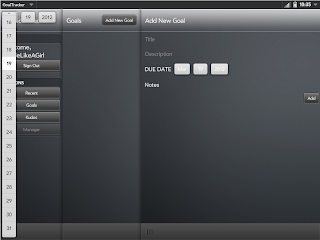
This is a problem I'm having with all the pickers in this project. None of them are opening up where they should. They always open up in the left hand corner. I haven't changed any of the code for the date picker, I'll I do is create one and put it in component and it opens up in the wrong place! Here's the code:

I've been working on a goal tracker program but I've run into some problems. I'm hoping some one will have an answer! I've posted on the Enyo forums to no avail!

{kind:"DatePicker", labelClass: "whitetxtColor", label: "Due Date", name: "addDate"}

I've been working on making my app look a lot nice with some css. I've been mostly successful minus this modal dialog for deleting goals. This first shot is just the normal standard css, the second is my attempt to change things. All I did was simply change the className and contentClassName properties and it does change them... just not the entire ModalDialog. Any tips on how to fix this problem? Here's the code:
{kind: "ModalDialog", name: "deletePopup", className: "bkdark", contentClassName: "bkdark", components: [//END OF LINE
{kind: "VFlexBox", flex: 1, components:[
{content: "", name: "confirmDel"},
{kind: "HFlexBox", components: [
{kind: "Button", flex: 1, caption: "Cancel", onclick: "cancelClick"},
{kind: "Button", flex: 1, className: "enyo-button-negative", caption: "Delete", onclick: "confirmClick"}
]}]}]}
Wednesday, March 7, 2012
Project Finished
I just have to show off... :D


And proof that it actually can do more than just that QR code, here's three different ones and they are a different version than the previous one.
Here's a link to the google code project. You can use whatever pictures... it's just very temperamental... you can only have a white background and the lighting has to be just so... but it works... mostly!
//END OF LINE

Yes, it's a QR code to my blog... but more importantly it works even when rotated.

And proof that it actually can do more than just that QR code, here's three different ones and they are a different version than the previous one.
Here's a link to the google code project. You can use whatever pictures... it's just very temperamental... you can only have a white background and the lighting has to be just so... but it works... mostly!
//END OF LINE
Tuesday, March 6, 2012
FINISHED!!!!!!
So it works! I've finished the programming part of my project! I was super excited to get it done!!!
I ended up using a library to take the bits of data and find the text/website that the QR code had stored in it.
It definitely still needs a lot of work before it will be really useful, but it should pass all the tests I need it to for this class!
//END OF LINE
I ended up using a library to take the bits of data and find the text/website that the QR code had stored in it.
It definitely still needs a lot of work before it will be really useful, but it should pass all the tests I need it to for this class!
//END OF LINE
Wednesday, February 29, 2012
Rotations Take 2
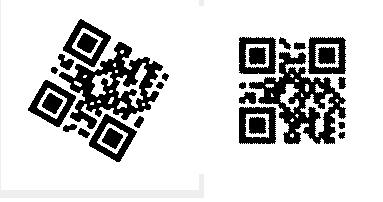
After finally sitting down and focusing on the math part, I was able to get my program to rotate my image by some angle of whatever I want!
 I'm pretty excited because that means I'm that much closer to being done. I also implemented an edge detection algorithm, which was pretty fun, and I'll be using it in conjunction with my rotation function to figure out and correct the skew of the image.

//END OF LINE

//END OF LINE
Thursday, February 23, 2012
It's all 1s and 0s
Luckily I've been getting back to working on this project... I sorta realized that it's due in a little over a month and I am bound and determined to have a life (besides doing this...).
Today I still skipped out on working on rotations... (once again not looking forward to the trig and matrix multiplication I'll probably have to be doing) but I did get something else accomplished. Once I have the QR Code pulled out, I can determine the bits of information from that image.

//END OF LINE
Today I still skipped out on working on rotations... (once again not looking forward to the trig and matrix multiplication I'll probably have to be doing) but I did get something else accomplished. Once I have the QR Code pulled out, I can determine the bits of information from that image.

So there's the original image, the pulled out and rotated QR Code and then the data array of all the bits of info! Unfortunately it only works on pretty straight, non-skewed images... I'll eventually get it there though.
All I have left to do is determine what the bits have been encoded to, finish the rotation stuff, and possible port this to an Android phone... (the last part is still to be determined... I may not have the time to get that done and will have to resort to something else....)
//END OF LINE
Wednesday, February 22, 2012
Rotations!
After a few hours of work I was able to get this....

//END OF LINE

The images on the lefts are the original picture and the ones on the right are the extracted QR code in the correct position!!!
Sadly it only currently works when the QR code is rotated 90, 180, or 270 degrees...
Unfortunately getting the rest of the rotations is going to involve some trigonometry. I haven't done that in a while and my brain has been mush the last couple of days from playing way too much minecraft. But soon I will google enough trig to rotate my image and get this project finished... hopefully!
//END OF LINE
Sunday, February 12, 2012
Excuses... Excuses...
I haven't worked on my project at all this week... My only excuse is that I've finally been given something to do at work. Also instead of coming home and working on it... I've become a pintrest member... yeah...
But I have decided that my children will grow up with weird parents... I'm going to put this by the door of my future house...

My children will also not have goals or tasks, but requirements that must be satisfied (and yes more than likely they will be ambiguous and incomplete).
So, here's to hoping that their first words will be "Hello, world!"

//END OF LINE
But I have decided that my children will grow up with weird parents... I'm going to put this by the door of my future house...

My children will also not have goals or tasks, but requirements that must be satisfied (and yes more than likely they will be ambiguous and incomplete).
So, here's to hoping that their first words will be "Hello, world!"

//END OF LINE
Friday, January 27, 2012
So yeah...
I think, but I'm still not certain, that I will be changing my senior project from developing in WebOS to the Android platform. The entire reason really is C++ vs Java. Normally I'm a big C++ fan but when dealing with images and simple GUI's... Java wins...
So in some of my research I've been doing just to get a basic idea of what to do in java, I've actually made some progress in the QR code detection area.
//END OF LINE
So in some of my research I've been doing just to get a basic idea of what to do in java, I've actually made some progress in the QR code detection area.


Yes I am really that excited I drew colored lines on this picture... but more importantly, my program was able to find the finder patterns on the QR code (the boxes in the corners), even when it wasn't a square QR code.
//END OF LINE
Wednesday, January 25, 2012
Stuck
Well I got a GUI design for my QR code up and running... which is great but it really doesn't do much with the current stub code I have. But I've run into some problems. Obviously javascript isn't going to be able to do the image processing I would like it to do so I have to use something else. Luckily WebOS has a PDK for just that sort of thing. It allows the developer to "seamlessly" integrate c/c++ into their app. Well that's all fine and dandy if I had an actually c++ program up and running (which of course I don't). So I've been doing some research as to how I'm going to implement the actually pulling out of the QR code from an image and I honestly have no idea. I have to figure out how I'm going to actually pull the image into the program (because c++ has no built in libraries for doing that) and then implement an actually algorithm for finding and then decoding the QR code. I just haven't had the time I need/want to do more research.
The weekend is coming up soon and I have another project due soon but hopefully I'll be able to get some time to figure out where I'm headed.
//END OF LINE
The weekend is coming up soon and I have another project due soon but hopefully I'll be able to get some time to figure out where I'm headed.
//END OF LINE
Thursday, January 19, 2012
Finally Some Success!!!
After many long days and nights of searching, struggling and always coming up empty handed, I have finally figured out how to take pictures using enyo on a WebOS platform. It has been so frustrating because all the resources I have found are slightly vague and not very useful. Documentation for the framework is slightly lacking from what I've seen and it's been a real fight to find a solution. But as I said before I have finally found one. I'm planning on implementing it in with the rest of my UI design for my QR Reader and hopefully it will all work out smoothly... (that never happens...).
But for those you just as frustrated as I was, here's my .js file for my project so far.
enyo.kind
({
name: "MyApps.Capture",
kind: "VFlexBox",
components:
[
{kind: "Video", name: "streamTheVideo", style:"width:98%;height:93%;top:6%;left:1%;position:fixed"},
{kind: "enyo.MediaCapture", name: "mediaCaptureCamera", onInitialized: "loadCamera",
onImageCaptureComplete: "pictureTaken", onError: "someErrorOccured"},
{kind:"Button", name: "myButton", caption: "Take Picture", onclick:"capturePicture"}
],
load: function()
{
this.$.mediaCaptureCamera.initialize(this.$.streamTheVideo);
},
rendered: function()
{
this.inherited(arguments);
this.$.mediaCaptureCamera.initialize(this.$.streamTheVideo);
},
unload: function()
{
this.$.mediaCaptureCamera.unload();
},
loadCamera: function(inSender, inResponse)
{
var format;
for (i = 0; inResponse["video:1"].supportedImageFormats.length != i; ++i) {
fmt = inResponse["video:1"].supportedImageFormats[i];
if (fmt.mimetype == "image/jpeg") {
break;
}
}
this.$.mediaCaptureCamera.load(inResponse["video:1"].deviceUri, fmt);
},
pictureTaken: function(inSender)
{
this.captureType = "IMAGE";
this.$.myButton.caption = "picture Taken";
},
capturePicture: function()
{
var myexifdata = {
orientation: 3
};
var ImageCaptureOptions ={orientation: 3,'quality' : 100,'flash':"FLASH_AUTO",'reviewDuration':5,'exifData':myexifdata};
this.picName = "PicSample" + Date.parse(new Date()) ;
this.$.mediaCaptureCamera.startImageCapture('/media/internal/dts/image/' + this.picName + '.jpg', ImageCaptureOptions);
}
});
Some of the stuff I'm probably and hopefully end up changing when I implement it in my QR Reader, but for now it just works.
//END OF LINE
But for those you just as frustrated as I was, here's my .js file for my project so far.
enyo.kind
({
name: "MyApps.Capture",
kind: "VFlexBox",
components:
[
{kind: "Video", name: "streamTheVideo", style:"width:98%;height:93%;top:6%;left:1%;position:fixed"},
{kind: "enyo.MediaCapture", name: "mediaCaptureCamera", onInitialized: "loadCamera",
onImageCaptureComplete: "pictureTaken", onError: "someErrorOccured"},
{kind:"Button", name: "myButton", caption: "Take Picture", onclick:"capturePicture"}
],
load: function()
{
this.$.mediaCaptureCamera.initialize(this.$.streamTheVideo);
},
rendered: function()
{
this.inherited(arguments);
this.$.mediaCaptureCamera.initialize(this.$.streamTheVideo);
},
unload: function()
{
this.$.mediaCaptureCamera.unload();
},
loadCamera: function(inSender, inResponse)
{
var format;
for (i = 0; inResponse["video:1"].supportedImageFormats.length != i; ++i) {
fmt = inResponse["video:1"].supportedImageFormats[i];
if (fmt.mimetype == "image/jpeg") {
break;
}
}
this.$.mediaCaptureCamera.load(inResponse["video:1"].deviceUri, fmt);
},
pictureTaken: function(inSender)
{
this.captureType = "IMAGE";
this.$.myButton.caption = "picture Taken";
},
capturePicture: function()
{
var myexifdata = {
orientation: 3
};
var ImageCaptureOptions ={orientation: 3,'quality' : 100,'flash':"FLASH_AUTO",'reviewDuration':5,'exifData':myexifdata};
this.picName = "PicSample" + Date.parse(new Date()) ;
this.$.mediaCaptureCamera.startImageCapture('/media/internal/dts/image/' + this.picName + '.jpg', ImageCaptureOptions);
}
});
Some of the stuff I'm probably and hopefully end up changing when I implement it in my QR Reader, but for now it just works.
//END OF LINE
Subscribe to:
Posts (Atom)